Disclaimer: This blog is for general information only and isn’t financial or legal advice from Nimble Journal (see our disclaimer). Fees and limits change often, so check the current terms in the Klover app before you borrow.
Quick answer: If you’re wondering what is Klover, the short version is that it’s a cash advance app that lets you get a small chunk of your next paycheck early, with no credit check and no interest. You link a checking account that gets regular direct deposits, request an advance, and Klover pulls the money back on payday. It’s a real, working company, so yes, it’s legit in the sense that it pays out. The catch is cost and data: fast delivery carries a fee, bigger limits often come from sharing personal data, and a federal lawsuit argues those fees make the advances function like very expensive loans.
Klover at a glance
| Category | Details & Terms |
|---|---|
| Max Advance Limit | Up to $750 (new accounts usually start smaller, often between $25 and $90). |
| Credit Impact | None — no credit checks, and advances are not reported to credit bureaus. |
| Interest / Late Fees | $0 interest and $0 late fees. |
| Standard Delivery | Free (takes about 1 to 3 business days). |
| Express Delivery | Ranges from $1.49 to $37.49 depending on advance size. |
| Eligibility Requirements | 90-day-old checking account with at least 3 recurring employer direct deposits. |
| Debit Card Verification | Card processing and account verification can take up to 3 business days. |
| Optional Membership | Klover+ is optional (typically $3.99 – $9.99/mo) for extra budgeting tools and credit tracking. |
| Limit Boosts | Earn points inside the app by watching ads, taking surveys, or sharing consumer data. |
What Is Klover?
Klover is a US mobile app that offers paycheck advances, plus a points program and optional money tools. Its pitch is simple: get cash before payday without a credit check, interest, or late fees. You’ll find it in the App Store and on Google Play as Klover, run by Klover Holdings, Inc.
Here’s something we noticed while checking Klover’s homepage: the site advertises advances “up to $750” in one banner and “up to $200” in other spots. Both numbers sit on the same page. That tells you a lot about how the app works in practice. The headline figure is a ceiling, and the amount you’ll see in your own account is usually much smaller, especially at the start.
So what is the Klover app, in one line? It’s a paycheck advance tool that makes money from speed fees, an optional subscription, and the ads and data offers in its points program.
How Does Klover Work?
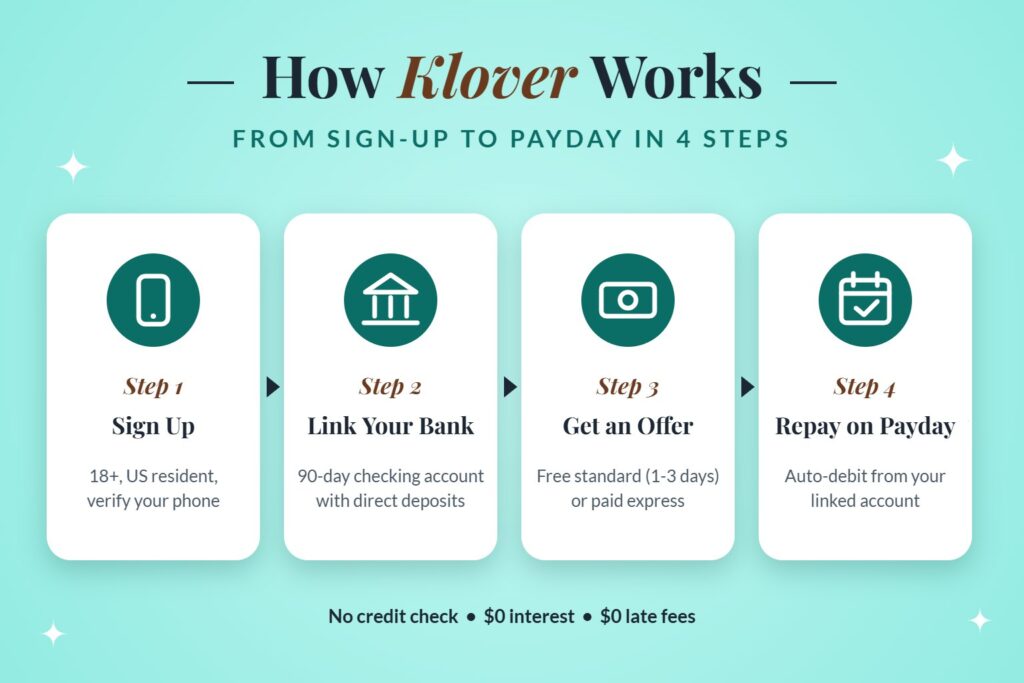
Klover works in four steps: you sign up, link your bank, get an advance offer based on your deposit history, and repay automatically on your next payday. Standard delivery is free but slow. Instant delivery costs an express fee. Points earned from surveys, ads, and data sharing can raise your limit.
Who qualifies for a Klover advance
Klover judges you on your bank history. Independent reviews in 2026 consistently list the same basics:
- You’re 18 or older and live in the US.
- Your checking account has been open and active for about 90 days.
- You’ve had at least three recurring direct deposits from the same employer within roughly 60 days.
That last rule trips up a lot of people. Gig workers paid through apps, folks who deposit cash, or anyone who just switched jobs may not qualify yet, even with steady income. Klover wants to see a predictable paycheck landing in the account it can debit later.
How much you can actually get
NerdWallet’s Klover review describes advances “up to $750 that fund within a couple days.” In reality, first-time limits tend to land well below that. Your offer depends on how much and how often you get paid, and it can grow as you build a repayment record with the app.
The fastest way to raise it inside the app is points, which we’ll get to in a second.
Standard delivery vs. express delivery
You get two choices when you request money:
| Option | Speed | Cost |
|---|---|---|
| Standard | About 1 to 3 business days | Free |
| Express | Usually within minutes | A fee that rises with the advance amount |
Reported express fee ranges vary from review to review, running from a couple of dollars on small advances to roughly $20 or more on larger ones. NerdWallet sums it up: if you want the money sooner, “you’ll pay a steep fee.” Check the fee shown in the app before you confirm, every time.
Klover Points: the data trade
Klover Points are earned by watching ads, answering surveys, and sharing information, such as linking other accounts or allowing location access. You can spend points to boost your advance or to cover an express fee.
This is the part worth slowing down on. Klover’s homepage says your data is anonymized and protected with “military-grade (256-bit) encryption,” which covers how it’s stored. Sharing more data for a bigger advance is still a trade you’re making, and it’s your call whether a higher limit is worth it.
Klover+ subscription
Klover+ is an optional monthly subscription with budgeting and credit-monitoring features. Reported prices in 2026 range from about $3.99 to $9.99 a month depending on the source and plan. You don’t need it to get a basic advance. If you sign up, set a reminder to review it, since small subscriptions are easy to forget.
Repayment
On your next payday, Klover automatically pulls the advance back from your linked checking account. Klover advertises no interest and no late fees. Make sure the money will actually be there, though. If the debit hits an empty account, your bank may charge its own overdraft or NSF fee, and Klover has nothing to do with that one.
How Long Does Klover Take to Verify a Debit Card?
Klover debit card verification usually takes up to 3 business days. Klover places small test transactions on the card, then asks you to confirm the exact amounts in the app. Weekends and federal bank holidays don’t count, so a card added Friday afternoon may not clear until midweek.
Here’s how the timing tends to play out:
- Phone number check: nearly instant.
- Bank account link: usually minutes to a few hours.
- Debit card verification: up to 3 business days, because the test charges have to be posted.
If you’re asking how long it takes Klover to verify a debit card because yours seems stuck, try these before contacting support:
- Look at “pending” transactions. The test charges are tiny and easy to miss, and they may not show in your main list yet.
- Use a real debit card tied to the same checking account you linked. Prepaid and credit cards often fail.
- Don’t remove and re-add the card repeatedly. That can restart the clock.
- Wait the full 3 business days, then reach out to Klover support with the card’s last four digits and the date you added it.
One practical tip: add your card on a Monday or Tuesday if you can. You’re far less likely to have the weekend swallow two of your waiting days.
Is Klover Legit?
Yes, Klover is a legitimate company that delivers the advances it promises, and it isn’t a scam. Still, “legit” and “a good deal” are different questions. The app’s fees, data-for-points model, and an ongoing federal lawsuit are all worth knowing about before you sign up.
What checks out
- It pays out. Klover is an established app with strong ratings on both the App Store and Google Play.
- No credit check. Approval comes from your bank activity, so a thin or damaged credit file won’t block you.
- No interest or late fees on the advance itself, according to Klover.
- A free option exists. If you can wait 1 to 3 business days, a standard advance costs nothing.
Red flags worth knowing
The biggest one is legal. In Moss v. Klover Holdings, Inc., filed in 2025 and now in federal court in Illinois, an active-duty Army staff sergeant alleges that Klover’s express fees and tips are really finance charges. According to Open Class Actions’ summary of the case, the complaint claims the effective annual rate on his advances “often exceeded 300%,” and that one advance topped 1,200%.
On March 5, 2026, the judge denied Klover’s motion to dismiss, so the case moved forward. That ruling doesn’t decide whether Klover broke any law. At the time of writing, no class had been certified and no settlement had been announced. Klover had argued its advances aren’t credit and pointed to a December 2025 CFPB advisory opinion, which the court didn’t accept at this early stage.
Everyday user gripes are smaller: starting limits far below the advertised maximum, forgotten subscription charges, and a lot of data requested for a modest boost.
Is the Klover cash advance legit for your situation?
Here’s how we’d think about it. Klover makes the most sense for someone with a steady W-2 paycheck who needs a small amount to cover a one-off gap, like a utility bill due three days before payday, and who can wait for standard delivery.
It makes less sense if you’d pay the express fee every time, if you’d be stacking advances from several apps, or if you’re uneasy about trading personal data for a bigger limit. Repeated advances can leave you short on every payday, which keeps the cycle going.
What a Klover Advance Really Costs
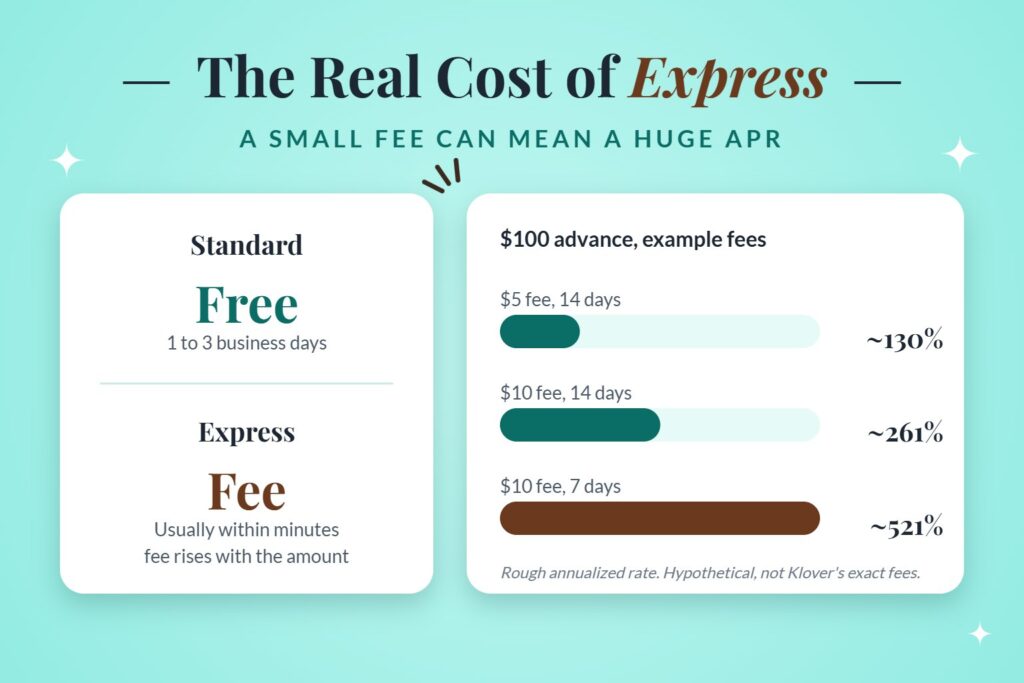
An express fee looks small in dollars, but it’s large compared with the money borrowed and the short time you have it. The cleanest way to see this is to turn the fee into an annual rate, the same way a credit card or loan states its APR.
Here’s a simple, hypothetical example. These aren’t Klover’s exact fees; check the app for those.
| Advance Amount | Express Fee | Days Until Payday | Fee as % of Advance | Rough Annualized Rate (APR) |
|---|---|---|---|---|
| $100 | $5 | 14 days | 5% | ~130% APR |
| $100 | $10 | 14 days | 10% | ~261% APR |
| $100 | $10 | 7 days | 10% | ~521% APR |
The math: fee divided by advance, divided by days, times 365. Notice that a shorter gap to payday makes the same fee look even pricier. For comparison, the Military Lending Act caps covered loans to service members at 36%, which is exactly why the lawsuit above leans on that law.
The takeaway is practical. A $10 fee once in an emergency is a cost you might accept. Paying it every two weeks adds up to $260 a year for the privilege of getting your own paycheck early.
Before You Tap “Request”: A Quick Checklist
Run through these four questions first:
- Can I wait 1 to 3 business days? If yes, choose standard delivery and pay nothing.
- Will my paycheck cover the repayment and my bills? If not, the advance only moves the gap to next week.
- Am I okay with the data I’m sharing for points? Read the prompt before tapping accept.
- Do I have a subscription running? Check Klover+ in your account settings and your bank statement.
If you answer “no” to the first two, a call to your biller asking for a few extra days, or a small credit union loan, may cost less than an express fee. Trimming everyday spending helps too, and our guides on how to thrift like a pro and how to look expensive on a budget are an easy place to start.
Final Thoughts
Klover is a real app that does what it says: it fronts part of your paycheck without a credit check. It works best as an occasional, free, standard-delivery bridge for someone with steady direct deposits. The costs creep in through express fees, an easy-to-forget subscription, and the personal data you trade for points. Keep an eye on the Moss case too, since its outcome could change how apps like Klover price speed. Use it on purpose, wait for the free option when you can, and treat the express button as an emergency tool.
Frequently Asked Questions (FAQs)
Q. What is Klover?
Klover is a US cash advance app that lets you access part of your upcoming paycheck early. It doesn’t check your credit or charge interest. Instead, it looks at your direct deposit history, offers an advance, and automatically collects repayment from your bank account on payday.
Q. Is Klover legit or a scam?
Klover is a legitimate company, and it does deliver advances. It isn’t a scam. However, it charges express fees for instant cash, uses a data-for-points program, and faces a pending federal lawsuit over whether those fees count as finance charges. Read the terms before you borrow.
Q. How does the Klover app decide my limit?
Klover sets your limit based on your linked bank account, mainly how much and how often your employer pays you through direct deposit. New users often start with small amounts. Repaying on time and earning Klover Points can raise the limit over time.
Q. How long does Klover take to verify a debit card?
Klover’s debit card verification usually takes up to 3 business days. The app sends small test transactions to your card, and you confirm the amounts in the app. Weekends and bank holidays don’t count toward that window, so timing can stretch longer.
Q. Why is my Klover card verification taking so long?
Common reasons include test charges sitting in your pending transactions, using a prepaid or credit card, or a card linked to a different bank account than the one you connected. Removing and re-adding the card can reset the process. Wait 3 full business days before contacting support.
Q. Does Klover check your credit?
No. Klover doesn’t run a credit check to approve advances, so applying won’t affect your credit score. It decides eligibility from your bank account activity, mainly recurring direct deposits from an employer over the past couple of months.
Q. What happens if I can’t repay Klover on time?
Klover advertises no late fees, and it collects automatically from your linked account on payday. If there isn’t enough money, your own bank may charge an overdraft or NSF fee. Unpaid advances can also limit your ability to get future advances from Klover.
Q. Is the Klover cash advance legit for military members?
Klover advances are available to eligible users, but service members should know about the Moss v. Klover Holdings lawsuit. It alleges that Klover’s fees break the Military Lending Act’s 36% rate cap. The court hasn’t ruled on that question yet, and the case is ongoing.